Crikey I’m just an ordinary user trying to help but cant be dealing with those of superior intellect who won’t respect the effort.
Thanks for putting me in my place. I won’t bother in future.
You may notice I’m the second user on this feed trying to assist with a poor response from you for their freely given time, so suggest you do some soul searching on your communication skills.
I did see earlier today my error in assuming all memory address locations are in NVRAM in the mixer. I’d forgotten about memory spaces in CPUs and chipset so was in error re how I used the terminology in my written comms. But we all make mistakes right. That’s no excuse for failing to be polite to those assisting you.
I know other A&H consoles have a indicator that shows the “last recalled scene”. On the Avantis and Dlive for example, there is a little triangle (like a “play” button) that shows up next to the name of the last recalled scene in the scene manager. It makes it very easy to see which scene was recalled last. Obviously the CQ is lacking this distinction, and I can absolutely see where it would be an important feature to add.
So while I think it was important to clarify what is actually possible when dealing with the scene manager (ie showing the “last recalled scene” rather than the “current scene” which is impossible), the overall intent of the request is not invalid or unimportant IMHO.
Maybe I can add my two cents.
If, for example, a theater is working with scenes (that’s why they’re called that), displaying the current and next scene is very important.
There, for example, it can happen that you have to start several scenes and sound recordings within a short period of time.
You’re half glued to the playbook, half on the stage, you get announcements from a stage manager and you really have your hands full.
Being able to make sure that you’re in the right scene in such situations is a blessing.
Of course, you could say that the CQ and its scene management aren’t made for theater - especially because there are no recall filters.
But I still think that displaying the scenes is by no means the least important wish - and one that could even be realized with the existing hardware.
I play guitar and sing live to pre-recorded drum and bass tracks (using Reaper on a laptop).
CQ-18T Scene 1 has fx, eq, and other CQ-18T settings specific to Song 1.
CQ-18T Scene 2 has fx, eq, and other CQ-18T settings specific to Song 2.
…etc.
At the moment I do this manually, but eventually I’m hoping to use MIDI to automatically recall the appropriate Scene when I queue the Song in Reaper.
So my Scenes aren’t changing during the performance, unless I specifically want them to.
Not really sure what is going on behind the scenes (lol!), but it would be immensely helpful to see at a glance which Scene is currently selected when I queue a song.
As a workaround (found somewhere in these forums), I have renamed the MainLR output to the Scene name.
I’ve also played around with Mixing Station and have created an on-screen label that displays the current Scene. Not a huge fan of MS though, tbh…
thank you for using the word “bullshit” is perfectly appropriate.
anyway
what i would like is
in the scene page (or possibly in a place that is more visible) to have an indication of the last selected scene for example a border around it or something
to have something like a dot near the scene name if the current state of the mixer is different from the last recalled scene
in this way i know if i have to resave the scene (or not) and what scene to resave → i often forget what scene i was using especially if I’m trying some changes
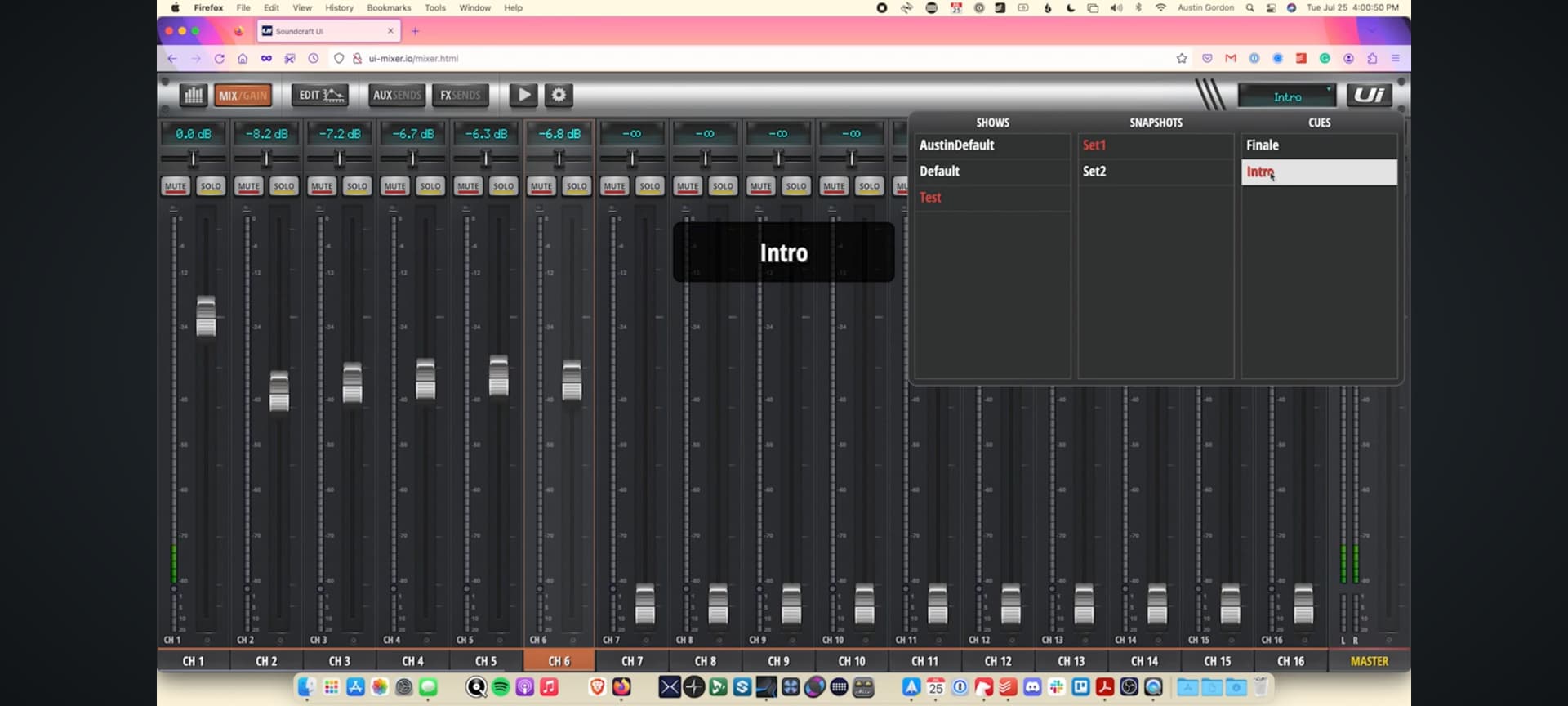
for example in the soundcraft ui24r the current show and scenes are in red in the ui and are easily accessible from the main mixing page in the cq i have to go to a different page and open the third tab not really visible during a show (i currently write down the scene name on a piece of paper)
I agree 100% …I believe A&H is the only Co. that does not display scene name on desk or on app/ Edit app. I’m still wondering why the the long long explanation about something that was not even asked. This could be part of the company stumbling nonsense. The CQ18T is a wonderful little console that could be possibly used in many different situations. The fact that you cant view the scene name is utterly silly in 2025. I cannot install this desk for any situation because of this simple and completely illogical programing fault