Just purchased the QU-7D for our church, using it with the AR2412 for all connections. I am used to analogue mixers and have used a digital mixer just a few times, so please bear with me.
I have FOH plugged into outputs 11/12. Is this the same as the out to speakers A/B on the back of the console?
To monitor this FOH mix and adjust it, do I use MainL/R or aux 11/12?
To mute a DCA group, do I need to use Mute Group with it? So can you mute a DCA group without using a Mute Group?
How do the 12 outputs on the AR2412 equate to the 12 aux buttons on the QU7D?
Have a Roland electronic drum kit. Should I put that into a Group or a DCA?
I would suggest that you read the QU 5/6/7 user guide.. It will teach you a lot about how to use the console. It may be a little overwhelming at first, but the more you read it - especially in front of the console so you can try what the manual is explaining - the more you will understand.
Digital consoles don’t have any defined audio paths like analog consoles do. Generally speaking, you can route any audio input to any audio output. Selecting where audio goes is called patching and the user guide talks about it on pages 42-47. You need to patch both inputs (deciding what channel each audio input gets routed to) and outputs (deciding which physical output each audio buss gets routed to).
Besides the Main LR mix, you have a maximum of 12 additional mixes available (in this configuration at least 6 of which would be mono).
The mixes can be aux or groups.
So, if you need 12 mixes as aux for your monitoring, you no longer have the option of using groups.
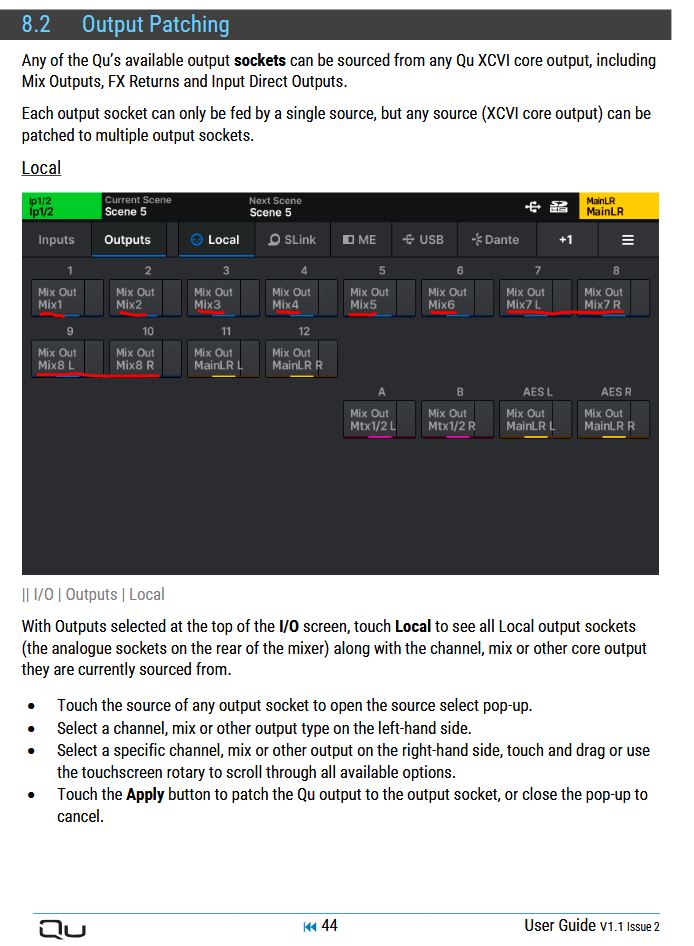
In the following image from the patching diagram (QU-5), I’ve underlined aux (mixes) 1 - 8 in red.
But nevertheless, there is a default setting, that are mix 1-6 on outputs 1-6 and (stereo-)mix 7-12 are on outputs 7-18, 19 and 20 are by default the main left and right.
When we moved from an analogue to digital mixer at our Church (many years ago), I just configured the digital mixer to be the same configuration as our previous analogue mixer (same input and output connections, same fader assignments, same AUX assignments etc.) and our volunteers (after some cross training) were able to happily use the digital mixer after a short space of time. We then started to sneak in upgrades on the digital desk.
The input and output connections can be freely assigned to channel faders, main L/R out, AUX mix outs etc. The mixer will come with a default assignment, but you can use the input and output patch facility to vary this.
You have to (simplistically) view a digital mixer as a combination of an analogue mixer plus an input and output patch bay plus a whole load of outboard equipment plus a means of saving (and restoring) everything on demand! And this is just for starters!
There are some good training videos on the A&H website and YouTube. Also, try and understand the block diagram.
Maybe find someone who has some Allen Heath QU experience and bring them in for few hours of hands on training. Videos are good but nothing beats one on one questions and answers.
I perfectly understand your position! About 14 years ago, after many years using analogue desks, since the late 1960s to be precise, my church bought an ILive system! This was a very steep learning curve! Fortunately the guy in charge of our team was a sound engineer for BBC Radio. This is the point of my post, you really need to find someone local who can actually give you practical lessons. No amount of reading manuals can be as good as hands on training, even if it costs money.
The first things that are most important
1 FOH is usually Main L/R and not one of the 12 mixes
2 mix 1 through 12 can be either aux or groups
3 Mix one to six can be six mono OR three stereo
4 mix 7 to 12 can be six mono or six stereo.
5 The max number of stereo mixes is 9
6 The maximum number of mono mixes is 12
7 You can route a group to an aux but not an aux to a group
8 You can route aux to a matrix (one of 3 independent of mixes) for further processing
I do hope this gives you a brief extract of the most important points of internal routing of the new QU range
So since this has 12 auxs can i have 7 mono in-ears, 2 chns for the live stream and 2 groups. Does that make 13 or is it 11 because groups are already stereo?
Neither: 7 + 3 mixes equals 10.
It’s as I already wrote to you:
So, for example, if you have set your mixes 1-7 to mono, the remaining 5 mixes 8-12 are still available in stereo.
For example, your live stream stereo mix (= 2 channels) and 2 stereo mixes as groups.
In this case, you still have 2 more stereo (or mono) mixes available.
Everything is configurable under Setup - Config - Mix Stereo/Bus Config (see page 24/25 of your User Guide).
Thank you but if 8 and 9 are inputs on the back of the qu7 for the livestream left and right isn’t it then using aux 8 and 9 together. If not how do I change it so 8 and 9 inputs only use aux 8 instead of 8 abd9 together as I couldn’t find that in the menus?
Do not confuse the physical sockets with the mix buses, you can send any mix bus to any socket, local or remote.
You can even send the left and right of a stereo pair to totally different places.
I regularly send to different stage boxes.
Please refer again to the image shown above.
Here, for example, mono mixes 1-6 are patched to local output jacks 1-6, and stereo mixes 7-8 are patched to the local output jacks 7-10.