Puzzling this and can’t seem to make it work like I want.
In-ear cuing to on-camera talent. In-ear part is no problem, RF from transmitter out of DT168.
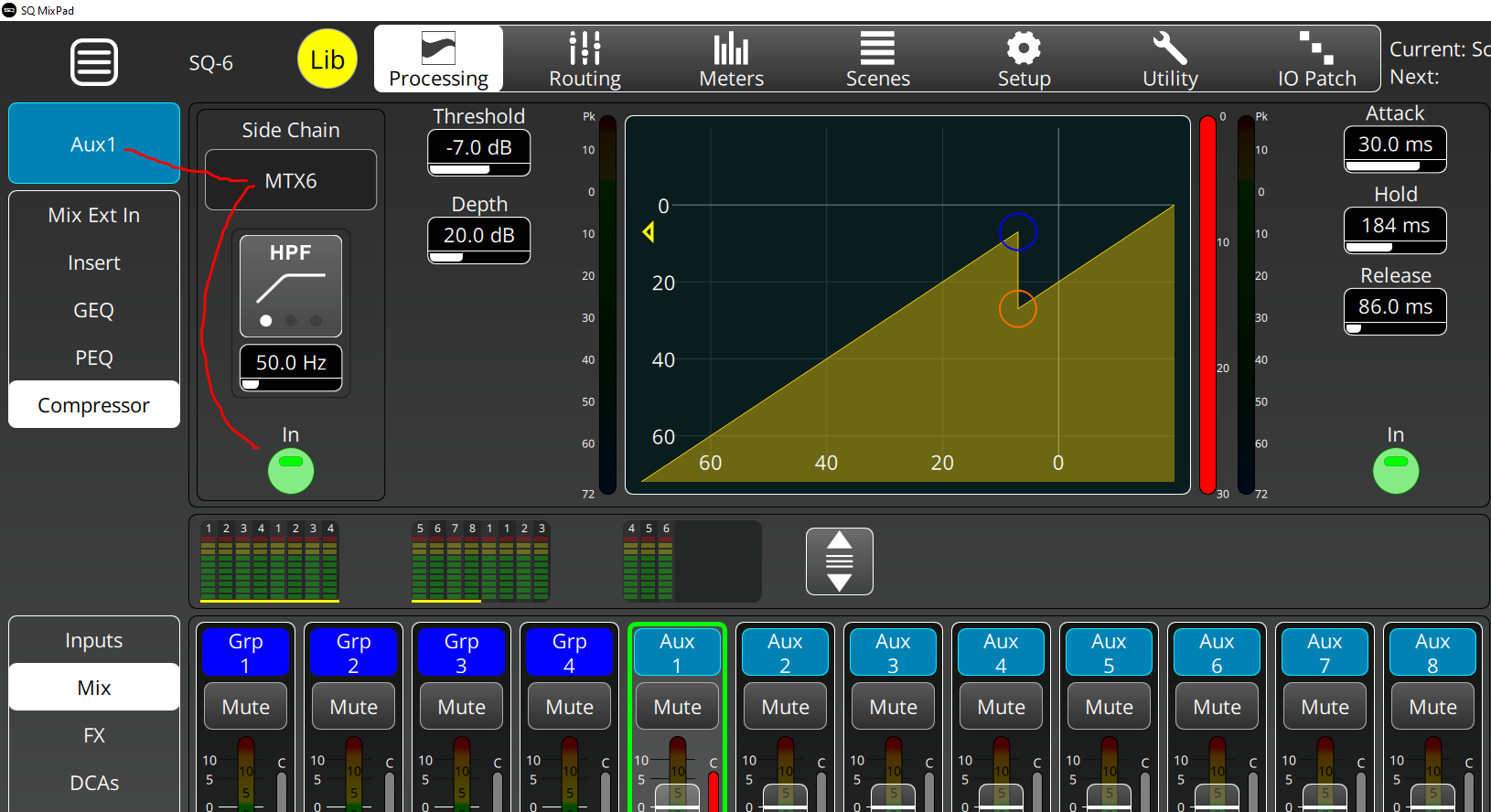
I want to route the Main L/R (mono) and the Talk mic to the output on the DT168. Got that to work using a matrix (is that a better/other way?) but I’d love for the Talk mic to duck the Main L/R a bit, but for obvious reasons, only the Main L/R in the Cue feed. I would assume that there might be a way to externally key the compressor on the Main L/R cue feed with the T/B mic but I can’t seem to make it work.
The built in talk back mic might not be an assignable option for the ducker to side chain to, but if you switch to using a normal channel for your talkback, I bet this will work as expected. You should be able to assign a normal channel as the side chain source for the ducker.
Of course you’ll loose the push to talk functionality of the built in talkback mic setup, but using a mic with a built in switch can work just as well.
Yeah, I though about that but my client really needs the features in the Talk Mic box. I may just need to set the level of the broadcast return low enough that the producer can talk “over” it. It’s just mostly for cueing musos onto the stage as the on-air announcer tell the radio audience who is coming out, so not a “do or die” situation.
You would only need a free mix or matrix for this.
Assign your talkback to this as well, solely for the purpose of generating a sidechain signal.
Then you could use this with the desired ducker.
Same client but not directly concerned with Simon. More so with the local FM broadcast that goes along with these performances. This function will come from the SQ in the broadcast booth.
So right now, I have both the Main L/R and the talk mic assigned to Mtx1, but I am still at a loss for how to assign the talk mic to the matrix’s compressor as a ducker for the Main L/R only; not the whole matrix feed?
Perhaps there was a slight misunderstanding.
Since you wrote “Main L/R (mono)”, I assumed you had already created a mono aux that follows the Main LR mix (meaning Post Delay/AMM, everything post-fader and all sends at 0 dB, including the FX returns).
If I understand your plan correctly, you would need to do the same if you want to duck the “Main LR” in one instance and not in another - that is, using two separate mixes with identical content.
So, you send your actual “Main LR” to the broadcast and your identical “Control Main LR” via an aux (e.g., Aux 1) to your Matrix 1 (for your in ear).
You then assign your talkback not only to Matrix 1 but also, as already described, additional to a free mix or matrix, e.g., Matrix 6.
Finally, you sidechain the compressor/ducker in your Aux 1 from Matrix 6.
(Matrix 6 is used exclusively to generate the sidechain signal.
It does not forward any audio signals and you can even mute it.)
Hi SQUser. I am a bit frustrated as I read your reply ad can’t figure out how to implement your scheme. “I should know this.”
I can not figure how to get the matrixes to route to an Aux, I can not figure out how to use Matrix 6 Talkback Mic as the side chain for the compressor. Compressor on the Matrix 1 or the Aux that I can’t seem to feed? Ugh and thanks for your patience on this.
Weirdly enough, I have searched the owner manual (1.6) and find little that speaks to the matrixes.
That’s also not possible; only the other way around works.
Previously, you routed your Main LR to the matrix 1, and now you should only route your Aux 1 (with the Main LR mix) to the matrix 1.
To summarize again:
Your talkback signal assign only to MTX 1 and MTX 6.
Aux 1 is an identical mix of your Main LR and is only used to duck the signal.
MTX 6 is only used to create a sidechain for ducking.
MTX 1 is used to add your talkback signal to the ducked Aux 1 signal.
First, thaks to this site for all the AI (Audio Intelligence). I love the community.
Wow. Now I feel really stupid that I am just not processing this setup. I now have the Talk Mic clearly ducking Aux 1. But I can not figure what feed the on-camera talent should get. You say Aux 1 is only used to duck whatever channels are assigned post fader to Aux 1. If I listen to the output of Aux 1, I hear the channels get ducked but I don’t hear the Talk Mic.
I apologize for being so dense here and appreciate your thoughtful and specific help. If you’d like to help some more and feel like taking it off this forum ad going to a PM, I am okay with that. Probably every one else here understands but me and I’ve been an audio pro for more years than I care to claim. I just can’t follow the logic on this and really don’t want to just give up in frustration.
You route your obviously already ducked Aux 1 signal to MTX 1 and assign your talkback there.
And the output from MTX 1 goes to the moderator, as you yourself wrote in your first post: