Hi.
To paraphrase the guy in the old Dos Equis ads…
“I don’t often mix on an iPad, but when I do… I’m often running Spotify”
I use SQ Mix Pad on a not-quite-current iPad (6th gen).
Works great. Except that when I flip over to the Spotify app to look at / change the music I’m streaming, and stay on that app for more than a little while, Mix Pad has lost its connection to the board when I flip back to it. Have to reconnect to the SQ… takes a few extra seconds.
It’s a small (but frequent) annoyance when I’m sitting in my studio chilling out and just using Mix Pad as a remote volume control from the ‘client couch’.
It’s a bigger annoyance when I’m playing walking-in music at a gig, the Emcee shows up unexpectedly, and I’m am not near the board to mute the music and light up their mic.
I’m assuming this is a multi-tasking issue of some sort… is there is a way around this? Do newer iPads, and/or other tablets / OSs, handle this better?
Thanks in advance for any suggestions, and apologize if this is a duplicate topic.
1 Like
I’m afraid this is an Apple thing.
Mixing Station handles it better because as soon as you switch back to the app, it tries to automatically reconnect and usually does so within a second.
I wish A&H would do the same. I put it in a feature request somewhere I think!
3 Likes
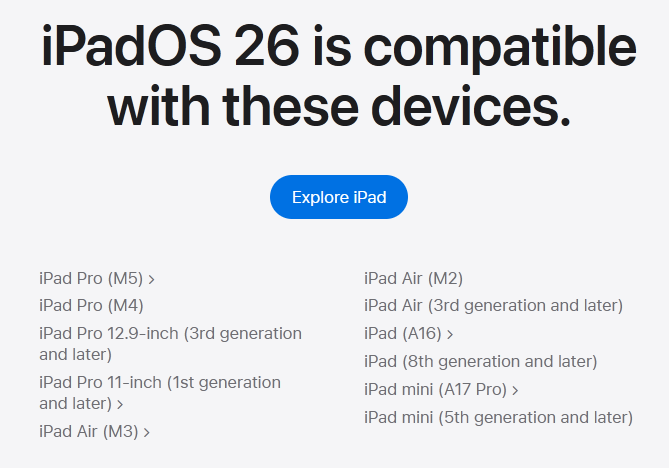
You could try entering the multi-window mode in iPadOS 26. That way both apps would be “active” at the same time. I think
Not available on all devices, so will depend on what model his 6th Gen device is:
Ah, thanks. Mine’s a 6 th gen iPad. Runs v 17.something.
I think we have one 8th gen in the house… I’ll take a look.
1 Like
Mixing Station will now stay connected in the background, as long as you have MIDI enabled. It runs a little null MIDI process, and that is enough for iOS to leave it alone.
1 Like
Same issue on Android devices btw. I once tried to enable “Allow App to run in Background” in the Android app info screen - which kind of worked, but it also led to instability/crashing of Mixpad… Auto-Reconnect to the previous connection (for all apps, i.e. Mixpad, SQ4U, SQ Control) would be a great feature/enhancement! Of course this would probably apply to the apps for the other A&H desk ranges…
Just for completeness if someone hits this thread in a search… I finally upgraded my iPad to a more recent model, and am now running the latest IOS.
It does seem that as long as you have Windowed Apps enabled, and e.g. Spotify and MixPad showing simultaneously (tiled, overlapped, ‘slide over’, whatever), MixPad stays active and doesn’t drop its connection to the mixer.
Definitely an improvement, if you use the multitasking features with some care. I’m finding it fiddly, ATM, but am sure I’ll get better at it.
After some Googling, I’d thought the more bullet-proof solution to this might be to go to Settings/”Background App Refresh” and enable it for SQ MixPad… but alas, it doesn’t appear in the list of apps for that setting. I’m not an IOS developer, but it seems like getting A&H to implement that feature for the IOS build of MixPad might be the real fix for this.
1 Like